How to Play Tivo on TV through Plex
For easily converting the Tivo to be suitable with Plex for playback on TV? You can find the Tivo to Plex solutions here.
TiVo is a brand and model of digital video recorder which works
just like any other digital recorder. However, the recorded TiVo files
usually are not compatible with most media players we adopt. Thus, it's
advisable to add Tivo to Plex for streaming to your computer, TV, PS3,
Xbox360, Android, iOS, and other DLNA-certified devices so that you can
watch them everywhere. Check the effective way to get TV shows off Tivo
to play on Plex nicely as below.
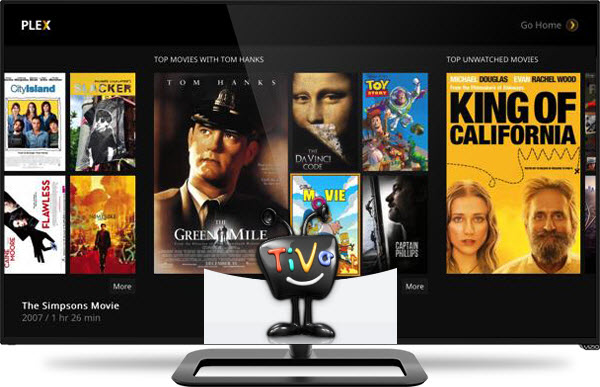
Frankly, Tivo filea are generally referred to as "encrypted video
format". Plex doesn't know "how to play Tivo-like sources". If you
really want to use Plex to stream Tivo files for playback, the easy
workaround is to convert Tivo to a fully compatible format with Plex,
like H.264/MPEG-4 MP4 video format.
With a professional video app like Dimo Video Converter Ultimate,
you can on fast remove Protection from Tivo and finish Tivo conversion
for Plex without quality loss. In addition, it not only supports MKV
videos, but also handles various common video formats, like MXF, VOB, MKV, MTS, MOV, MP4, WMV, FLV, etc.
What's more, you will have the privilege of personalizing your
video files prior to conversion. This is because it comes with a
built-in editor that will give you the freedom to manipulate key aspects
of the files. You can trim it down to reduce size; you can embed a
watermark to brand the video. If there are unwanted contents in your
video, you can remove using the editor. For Mac users, Dimo Video Converter Ultimate for Mac is also a helpful app to encode Tivo videos to Plex for further usage.
Part 1: Transfer recorded TV shows (*.tivo) to PC from TiVo box
FIRST, if you haven't got TiVo recordings on your PC, you need to transfer TiVo to your PC first.
Launch TiVo Desktop software on your PC. Connect TiVo to your home
network, and then the TiVo Desktop will provide you with a list of shows
for transferring to your PC. Then please transfer the TiVo TV shows you
want to PC. Once all the shows you selected have been downloaded from
your TiVo, they will appear in the Now Playing list in TiVo Desktop.
Part II. Simple Steps to convert and play Tivo files via Plex
Free Download Dimo Video Converter Ultimate (Win/Mac):


Other Download:
- Cnet Download: http://download.cnet.com/Dimo-Vi ... 140_4-77472903.html
- Soft32 Download: http://dimo-video-converter-ultimate.soft32.com/
- Software.informer Download: http://dimo-video-converter-ultimate.software.informer.com/2.7/
- Top4download: http://www.top4download.com/dimo ... imate/nsyrihrb.html
- Softpedia Download: http://www.softpedia.com/get/Mul ... rter-Ultimate.shtml
- windows7download: http://www.windows7download.com/ ... imate/bpphgnww.html
- download.html.it: http://download.html.it/software/dimo-video-converter-ultimate/
- yankeedownload: http://www.yankeedownload.com/so ... ultimate-lnpoi.html
- instaluj.cz Download: http://www.instaluj.cz/dimo-video-converter-ultimate
- komputerswiat.pl Download: http://download.komputerswiat.pl ... -converter-ultimate
- cuteapps Download: http://www.cuteapps.com/program- ... ftware-download.htm
- downloadcollection Download: http://www.downloadcollection.co ... verter_ultimate.htm
- itshareware Download: http://www.itshareware.com/prodv ... verter-ultimate.htm
- komputerswiat Download: http://www.komputerswiat.pl/nowo ... -dzis-za-darmo.aspx
- stahuj.centrum.cz Download: http://www.stahuj.centrum.cz/mul ... converter-ultimate/
- freedownloadmanager Download: http://en.freedownloadmanager.or ... erter-Ultimate.html
- Windows8downloads Download: https://www.windows8downloads.co ... -ultimate-fyqxbkug/
- Findmysoft Download: http://dimo-video-converter.findmysoft.com/
- Raritysoft Download: http://dimo-video-converter-ultimate.raritysoft.com/windows
Step 1. Load TiVo files
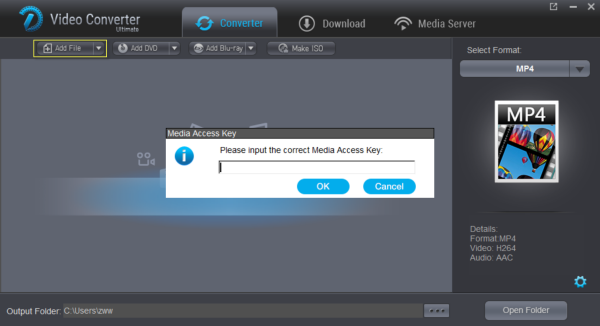
Start up Dimo Video Converter Ultimate as the TiVo to Plex Converter, and then click "Add file" to import all .tivo files.
Note: When first loading, The TiVo Video Converter will ask you to
input your Media Access Key. Simply enter your Media Access Key, and
click "OK" to confirm.
Step 2. Load original Tivo files
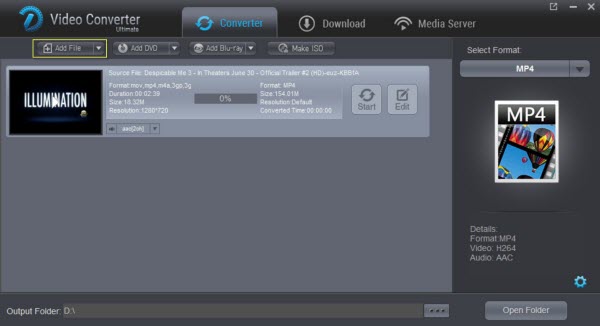
Click "Add File" button on the main interface to load your .Tivo
files to the program again. (Drag&Drop function is included.)
Step 3. Select output format
After you have successfully completed loading your TiVo, select the
output format and folder. Click "Select Format" and choose MP4 from
"Format > Video" as output format, which can be recognized by Plex
easily. If you do not have a ready folder, create one where you can
easily locate it.
Tips: With the right settings you can retain the quality of the
original videos while also saving space. This is particularly helpful
when streaming over your network, depending on your network quality.
Simply click Settings bar and you can tweak the settings to your
satisfaction and even save it as preset.
Step 4. Start Tivo to Plex Conversion
Finally, hit the "Start" button at the bottom of the main interface
to start the conversion. It will automatically convert Tivo to Plex
Media Server compatible video files. After the conversion, click "Open"
to quickly find the converted movies. Then, Plex will recognize,
catalog, play and stream these Tivo files to iPad, iPhone, TV, Android, Xbox, Playstation, etc. at ease.
In conclusion, if you are seeking for the best video output
quality, fastest video conversion speed, and the most formats supported,
Dimo Video Converter Ultimate will be a great choice.
Free Download or Purchase Dimo Video Converter Ultimate:


Need the lifetime version to work on 2-4 PCs so that your
friends and family can instantly broaden their entertainment options?
Please refer to the family license here.

Kindly Note:
The price of Dimo Video Converter Ultimate for Windows is divided
into 1 Year Subscription, Lifetime/Family/Business License: $43.95/Year;
$45.95/lifetime license; $95.95/family license(2-4 PCs);
$189.95/business pack(5-8 PCs). Get your needed one at purchase page.
Related Software:
Lossless backup Blu-ray to MKV with all audio and subtitle tracks;
Rip Blu-ray to multi-track MP4; ConvertBlu-ray to almost all popular
video/audio formats and devices; Copy Blu-ray to ISO/M2TS; Share
digitized Blu-ray wirelessly.
A professional DVD ripping and editing tool with strong ability to
remove DVD protection, transcode DVD to any video and audio format, and
edit DVD to create personal movie.
An all-around video converter software program that enables you to
convert various video and audio files to formats that are supported by
most multimedia devices.
A mixture of free HD/4K video player, music player, Blu-ray/DVD player, video recorder and gif maker.
Contact us or leave a message at Facebook if you have any issues.
Related Articles:
- How to Extract Audio/Music From DVD Easily
- Download BBC/iPlayer Videos
- How to Play QuickTime MOV files on WDTV from USB
- How to Play QuickTime MOV files on WDTV from USB
- How to Play QuickTime MOV files on WDTV from USB
- How to Play QuickTime MOV files on WDTV from USB
- How to Play QuickTime MOV files on WDTV from USB
- Watch AVI on Samsung TV via USB
- Watch AVI on Samsung TV via USB
- Watch AVI on Samsung TV via USB


Comments
Post a Comment