Convert DVD to SBS 3D MP4 with 3D effect


Here is a "How To" guide to convert DVD movies to 3D SBS MP4 for watching DVD Movie on 3D devices.

As the popularity of 3D movies nowadays, more and more people would like to go the cinema to enjoy the 3D movie with great visual enjoyment or see classical films with advanced 3D effect. Chances are you have a bunch of DVD collections, ever dreamed of creating 3D movies by yourself and enjoy on 3D TV, glasses-free 3D smartphones, or other compatible 3D display device? Here this article will shows you how to convert DVD movies into 3D SBS MP4 without any hassles so that you can enjoy 3D movies at home instead of going to cinema or storing with keeping 3D effects.
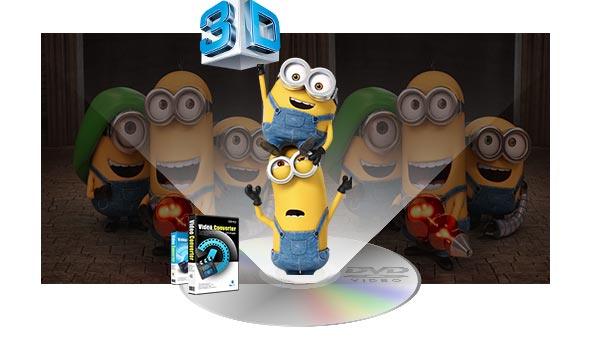

SBS 3D, short for side-by-side 3D, is the best solution which has been a widely used 3D format besides frame-sequential 3D when airing 3D contents over cable onto 3D TV. To rip DVD to 3D SBS MP4 videos, you need a professional DVD ripper to achieve our goal.

Here Dimo Video Converter Ultimate for Mac has the full capacity to rip or convert all the DVD, 2D/3D Blu-ray and 2D/3D movies in MTS, MKV, FLV, etc. to Side-by-Side 3D videos in a bevy of formats, including not only MP4, but also MKV, AVI, WMV, MOV on Mac. What's more, the creating SBS 3D videos could be left/right or top/bottom videos.

Furthermore, the built-in video editor allows you to easily get desired video part and effects. If you're using a Windows PC, please turn to Dimo Video Converter Ultimate, which enables you to convert DVD to 3D SBS MP4 videos on Windows PC (including Windows 10). Now download the right version and check out the guide below.

Free Download Dimo Video Converter Ultimate for Mac/Win:

         

Other Download:

How to rip DVD to SBS 3D MP4 format with ease

Step 1. Import DVD movie

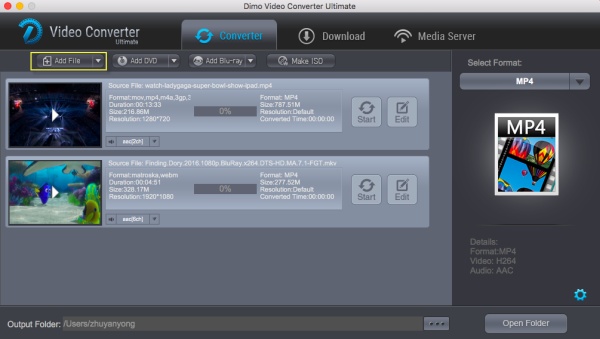
Launch the professional DVD converter. Click "Add DVD" button to add DVD movie to it. Double click the video, you can preview the movie by double clicking. From audio track option, you can select your desired audio track for output. And by clicking Edit, you can trim, crop videos, adjust video effects, add watermarks, etc.


Step 2. Choose output format

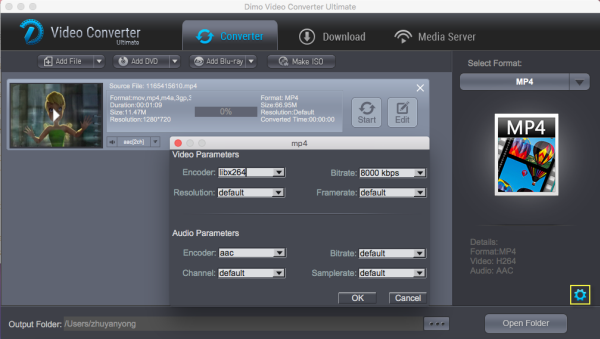
Tap on "Select Format" bar and find "Format > Video", there are a lot of format options for you. "MP4" is what you need here.


Step 3. Add 3D Effect

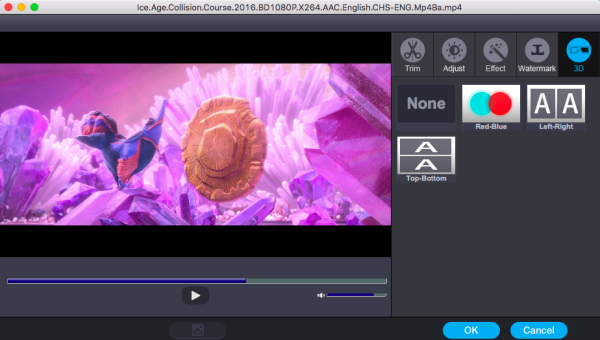
Click "Edit" and turn to 3D, then choose "Left-Right" and click "OK" to set 3D mode for viewing 3D movies with SBS 3D effect.


Step 4. Start ripping your DVD movies

Simply click the "Start" button under the preview window, and the DVD ripper will start the conversion from DVD movies to SBS MP4. After conversion, open output file destination, locate the created SBS 3D MP4 video and you could watch it on your 3D player, PC or VR hedsets as you want with a pair of assorted glasses.

About Side-by-Side 3D (SBS 3D)

SBS 3D, short for side-by-side 3D, is a widely used 3D format besides frame-sequential 3D. Side-by-Side 3D video consists of two halves on the left and right, with the entire frame for the left eye scaled down horizontally to fit the left-half of the frame, and the entire frame for the right eye scaled down horizontally to fit the right side of the frame.

Thus, in the case of 720p content (resolution of 1280 x 720), each frame will actually consist of the horizontally scaled frame for the left eye with a resolution of 640 x 720 and adjacent to it, the corresponding frame for the right eye at the same 640×720 resolution. When playing a Side-by-Side 3D video, a 3D PC or 3D TV will play the file with different 3D display technologies, mainly active shutter or polarization. That depends on your 3D hardware.

Advantage and Disadvantage of SBS 3D

It's clearly that the disadvantage of SBS 3D is the halving of the horizontal resolution of the image. And the quality of SBS 3D won't be as good as sequential 3D content. But this is not pretty much noticeable and won't affect 3D enjoying very much. Why SBS 3D is popular despite a downgrading of the output quality? For the advantages overweigh the disadvantage. First, SBS 3D uses the same bandwidth as regular HD content, so it can be transmitted in the same way that current HD signals are transmitted. It is suitable for cable or air television, and also can be used in most of TVs (and some projectors). As a result, you won't need an expensive set-top-box replacement for viewing 3D content. Besides this, SBS 3D is a nice way for you to copy and backup your 3D BD. With SBS 3D output, your backup disc can be decreased to a half size (or even smaller) of the source 3D to save you money.

Free Download or Purchase Dimo Video Converter Ultimate for Mac/Win:

         

Need the lifetime version to work on 2-4 Macs so that your friends and family can instantly broaden their entertainment options? Please refer to the family license here.

Kindly Note:

The price of Dimo Video Converter Ultimate for Mac is divided into 1 Year Subscription, Lifetime/Family/Business License: $43.95/Year; $45.95/lifetime license; $95.95/family license(2-4 Macs); $189.95/business pack(5-8 Macs). Get your needed one at purchase page.

Related Software:
BDmate (Mac/Win)
Lossless backup Blu-ray to MKV with all audio and subtitle tracks; Rip Blu-ray to multi-track MP4; Convert Blu-ray to almost all popular video/audio formats and devices; Copy Blu-ray to ISO/M2TS; Share digitized Blu-ray wirelessly.
DVDmate (Mac/Win)
A professional DVD ripping and editing tool with strong ability to remove DVD protection, transcode DVD to any video and audio format, and edit DVD to create personal movie.

Videomate (Mac/Win)
An all-around video converter software program that enables you to convert various video and audio files to formats that are supported by most multimedia devices.
8K Player (Mac/Win)
A mixture of free HD/4K video player, music player, Blu-ray/DVD player, video recorder and gif maker.
Contact us or leave a message at Facebook if you have any issues.

Related Articles:

Comments

Popular posts from this blog

Camtasia Studio Not Importing MXF Video- Solution

Open DVD with Windows Media Player for playback on Windows

Avid & FLV Problems: Best Way to Solve Avid Won't Import FLV Files flv-to-avid-mc avid codec converter, transcode avi to avid dnxhd codec, import flv to avid mc, convert flv to dnxhd, edit flv in avid mc [size=4]Problem importing FLV files to Avid Media Composer for further editing? Fortunately, there is an easy way to fix the issue. Check them out here.[/size] [url=https://en.wikipedia.org/wiki/Media_Composer]Media Composer[/url], frequently referred to as "The Avid", is one of the favored non-linear editing system(NLE). In your daily life, especially for some filmmakers and video enthusiasts, you may find that the Avid can't play FLV. Because, FLV usually contain material encoded with codecs following the Sorenson Spark or VP6 video compression formats. It can hold many different type of audio, video codec such as H.264, H.263, MPEG-4 ASP, MPEG AAC, etc. FLV also contains information such as duration, width and height, framerate, encryption, metadata. But, Avid supported video codec is limited, how can you import FLV to Avid Media Composer without any issue? Luckily, now with the Avid Codec Converter-[url=https://www.mediadimo.com/video-converter-ultimate-for-mac][b]Dimo Video Converter Ultimate for Mac[/b][/url], all issues can be fixed without any hassles. [img]https://www.mediadimo.com/images/boke/flv-to-avid-mc.jpg[/img] The software supports to convert FLV files in a wide range of video formats, including HEVC/H.265, [url=https://www.mediadimo.com/top-avi-player-mac.html]AVI[/url], Xvid, DivX, [url=https://www.mediadimo.com/convert-h265-to-h264.html]H.264[/url], MP4, 3GP, MKV, WMV, RM, FLV, MOV, WTV, [url=https://www.mediadimo.com/get-video-to-magix-video-pro.html]MXF[/url], MVI, F4V, Apple ProRes MOV, WebM, VP8, 720p, 1080p, 1080i HD,AVCHD videos and more. That is to say, it can transcode all the files (absolutely FLV included) into another target format(Avid DNxHD MOV) with high quality. Besides Avid Media Composer, this program can help you convert then import FLV video to Final Cut Pro, [url=https://www.mediadimo.com/import-mp4-to-imovie.html]iMovie[/url], FCE, Premiere, Davinci Resolve, and other editing applications. If you are running on Windows, you can turn to equivalent version [url=https://www.mediadimo.com/video-converter-ultimate]Dimo Video Converter Ultimate[/url], which is an easy-to-use yet FLV converter, player and editor as well as Mac version [b]Free Download Dimo Video Converter Ultimate for Mac/Win:[/b] [url=https://mediadimo.com/download/mke/index.php?pcode=vcm0][img]https://www.mediadimo.com/wp-content/uploads/2016/11/mac-download.png[/img][/url] [url=https://www.mediadimo.com/download/Dimo-vct-trial-setup.exe][img]https://www.mediadimo.com/wp-content/uploads/2016/11/windows-download.png[/img][/url] [b]Other Download:[/b] [list] [*]Cnet Download: [url=http://download.cnet.com/Dimo-Video-Converter-Ultimate/3000-2194_4-77376153.html]http://download.cnet.com/Dimo-Vi ... 194_4-77376153.html[/url] [*]Soft32 Download: [url=http://dimo-video-converter-ultimate-for-mac.soft32.com/]http://dimo-video-converter-ultimate-for-mac.soft32.com/[/url][/list][size=4]How to convert FLV to Avid MC[/size] STEP 1: After downloading, install and launch the program, directly drag FLV clips you want to edit or by clicking the "Add File" to import the file to Dimo cinverter.. [img]https://www.mediadimo.com/images/video/dimo-mac.png[/img] STEP 2: Choose Avid Media Composer native format. Simply go to Format and select "Editor > DNxHD 720P or DNxHD 1080P" as the best video format for editing videos in Avid with good video quality. [img]https://www.mediadimo.com/images/video/avid-mc-format.png[/img] STEP 3: Now, you click the "Start" button to convert FLV to Avid MC. Then the smart Avid video conversion app will start transcoding videos to specified format immedaitely. After conversion, you will get it. [b]Note:[/b] Dimo Video Converter Ultimate is also able to convert FLV and more videos to [url=https://www.mediadimo.com/play-mp4-on-iphone.html]iPhone,[/url] iPad, iPod, Android [url=https://www.mediadimo.com/galaxy-s8-movie-download.html]Samsung Galaxy[/url] series, Amazon Kindle, [url=https://www.mediadimo.com/watch-dvd-on-htc-vive.html]HTC[/url], etc. [b]Free Download or Purchase Dimo Video Converter Ultimate for Mac/Win:[/b] [url=https://mediadimo.com/download/mke/index.php?pcode=vcm0][img]https://www.mediadimo.com/wp-content/uploads/2016/11/mac-trial.png[/img][/url] [url=https://www.swreg.org/cgi-bin/s.cgi?s=145698&p=145698-22&q=1&v=0&d=0&rc=45K2D47HSJ&a=v][img]https://www.mediadimo.com/wp-content/uploads/2016/11/buy-mac.png[/img][/url] [i]Need the lifetime version to work on 2-4 Macs so that your friends and family can instantly broaden their entertainment options? Please refer to the family license [url=https://www.swreg.org/cgi-bin/s.cgi?s=145698&p=145698-23&q=1&v=0&d=0&rc=45K2D47H2S&a=v]here[/url][/i]. [url=https://www.swreg.org/cgi-bin/s.cgi?s=145698&p=145698-23&q=1&v=0&d=0&rc=45K2D47H2S&a=v][img]https://www.mediadimo.com/images/family.jpg[/img][/url] [b]Kindly Note:[/b] The price of Dimo Video Converter Ultimate for Mac is divided into 1 Year Subscription, Lifetime/Family/Business License: $43.95/Year; $45.95/lifetime license; $95.95/family license(2-4 Macs); $189.95/business pack(5-8 Macs). Get your needed one at [url=https://www.mediadimo.com/video-converter-ultimate-for-mac/purchase]purchase page[/url]. [b]Related Software:[/b] [b]BDmate ([url=https://www.mediadimo.com/bdmate-for-mac]Mac[/url]/[url=https://www.mediadimo.com/bdmate]Win[/url])[/b] Lossless backup Blu-ray to MKV with all audio and subtitle tracks; Rip Blu-ray to multi-track MP4; Convert Blu-ray to almost all popular video/audio formats and devices; Copy Blu-ray to ISO/M2TS; Share digitized Blu-ray wirelessly. [b]DVDmate ([url=https://www.mediadimo.com/dvdmate-for-mac]Mac[/url]/[url=https://www.mediadimo.com/dvdmate]Win[/url])[/b] A professional DVD ripping and editing tool with strong ability to remove DVD protection, transcode DVD to any video and audio format, and edit DVD to create personal movie. [b]Videomate ([url=https://www.mediadimo.com/videomate-for-mac]Mac[/url]/[url=https://www.mediadimo.com/videomate]Win[/url])[/b] An all-around video converter software program that enables you to convert various video and audio files to formats that are supported by most multimedia devices. [b]8K Player ([url=https://www.mediadimo.com/8k-player-for-mac]Mac[/url]/[url=https://www.mediadimo.com/8k-player]Win[/url])[/b] A mixture of free HD/4K video player, music player, Blu-ray/DVD player, video recorder and gif maker. [i][email=support@mediadimo.com]Contact us[/email] or leave a message at [url=https://www.facebook.com/mediadimo/]Facebook[/url] if you have any issues.[/i] [b]Related Articles:[/b][list][*][url=http://ireviewsky.com/cristiano-ronaldo/]Best moments of Cristiano Ronaldo[/url] [*][url=https://mediaora.com/adam-west/]Download Adam West best movies[/url] [*][url=http://iskyshare.com/upload-dvd-to-youtube/]How to Upload and share DVD movies onto YouTube[/url] [*][url=https://www.mediadimo.com/superhero-movies-download.html]Best Marvel Superhero Movies to be downloaded[/url] [*][url=https://www.mediadimo.com/download-bahubali-2-movie.html]Bahubali 2 The Conclusion Full Movie Download Free[/url] [*][url=https://lovemediasoft.blogspot.com/2017/06/h265-to-iphone8.html]Flawlessly Play HEVC/H.265 Video on iPhone 8[/url] [*][url=https://homemediatip.blogspot.com/2017/06/h265-to-youtube.html]Convert H.265/HEVC to YouTube for uploading[/url] [*][url=https://videogetstarted.blogspot.com/2017/06/flv-to-chromcast.html]Convert FLV to Chromecast for TV streaming[/url] [*][url=https://hotmovieguide.jimdo.com/backup-the-lego-batman-blu-ray/]How to backup The Lego Batman Movie Blu-ray[/url] [*][url=https://lovemtime.blogspot.com/2017/06/convert-video-ts-to-avi.html]Lossless Convert DVD Video_TS to AVI on Mac and Windows[/url][/list] Source: [url=https://videogetstarted.blogspot.com/2017/06/flv-to-avid-mc.html]Workflow for editing FLV in Avid MC[/url]